2011 will be an exciting year!
One of the reasons is the expected major release for Cordys BOP4: Fix Pack 1! (Maybe already in Q1?)
Though already am a “fan” of the current product (See my blog: Why Cordys BOP4) I have my top 10 wish list ready:
1. BPMN 2.0
As the formal release of BPMN 2.0 is due soon, and 99 percent of the standard is stable I hope for a solid support of this standard in FP1.
Especially extension of the event- and signaling mechanisms, and the addition of compensation constructs would be valuable features!
2. Data modeling
Currently it is possible to define data structures in BOP4. Additional UML class diagram-like modeling would greatly support the process of defining and communicating the business object model in a graphical way. Obviously MDM would profit too.
3. BAM Usability
As I already wrote in an earlier BLOG BAM Imperfections there are several possibilities to improve usability and flexibility of BAM. The good news is that Cordys already committed to these improvements, so expectations are high!
4. Document support BPM
Case Management already supports a kind of out-of-the-box document management. It seems little investment to allow documents to be attached to BPM Instances as well. This would prevent the need for a custom solution based on an external DMS or database solution.
5. Simulation
A fair simulation environment would be a welcome extension to the BOP4 stack. It should allow for defining the expected loads and spread, and the characteristics of the resource capacity. Reports over the simulation runs should allow for proper analysis and process optimization.
6. Complex Event Processing (CEP)
In automated environments where decision making is depending on the combination of several (types of) events Complex Event Processing (CEP) is a must-have. Addition of a CEP module would greatly increase the applicability of BOP4.
7. “Hot” business rules
BOP4 offers great facilities of defining business rules and decision tables. The feature of allowing business to “hot modify” the (values/business parameters of) rules without having to republish or redeploy them would increase the flexibility of the concerned business processes.
8. User interface: modeling versus scripting
For some fairly basic UI functions it takes java scripting in BOP4 (Example: the invocation of a business process). It would improve development efficiency to allow developers to model such behavior instead of scripting it.
9. BPM Complex Mapping
The BPM data mapping possibilities in BOP4 are quiet sophisticated. However certain types of mappings are not yet supported in the BPM mapping tool, where the underlying technology XSLT would allow so. Example: the mapping of two lists onto each other. One of the work arounds is to model these mappings in the BPM itself, obscuring the intended business functionality. Extension of the mapping functionality would prevent this necessity.
10. Reporting
Where BOP4 offers fairly advanced BAM functionality, plain reporting functionality is missing.
As the Cordys Process Factory (CPF) offers reporting functionality it should also not be rocket science to get it available for BOP4 too.
As Cordys claims the BOP4 product itself is the most valuable marketing instrument I have great expectations and I hope that (a late Santa) will generously fill my sock!
Harald van der Weel
Showing posts with label cordys. Show all posts
Showing posts with label cordys. Show all posts
Wednesday, January 19, 2011


Friday, January 14, 2011
Getting started with BOP4: Cordys Academy self study Training
I have received several requests to inform people on “how to start off with BOP4”:
Where to begin, how to learn about the features and how to get hands-on experience?
The good news: Cordys has recognized this need!
One of the reasons I have become eager to adopt Cordys BOP4 is the simple fact that Cordys Academy offers high quality training facilities.
Not just the conventional classroom courses: Also a great computer based BOP4 fundamentals! For free, and it can be taken anytime, anywhere!
The Cordys Academy is offering basically a complete package, consisting of the following:
- Self study environment
Link: https://wiki.cordys.com/display/acorg/Cordys+BOP-4+Self+Study+Training+Environment
- Fundamentals Tutorial
Link: https://wiki.cordys.com/display/acorg/Cordys+Fundamentals+BOP-4
- Several advanced topics (“Training extensions”)
Link: https://wiki.cordys.com/display/acorg/Training%20extensions
Access to these sites only requires registration.
This can be arranged instantly through any of the links above. Each will result in the login screen below:
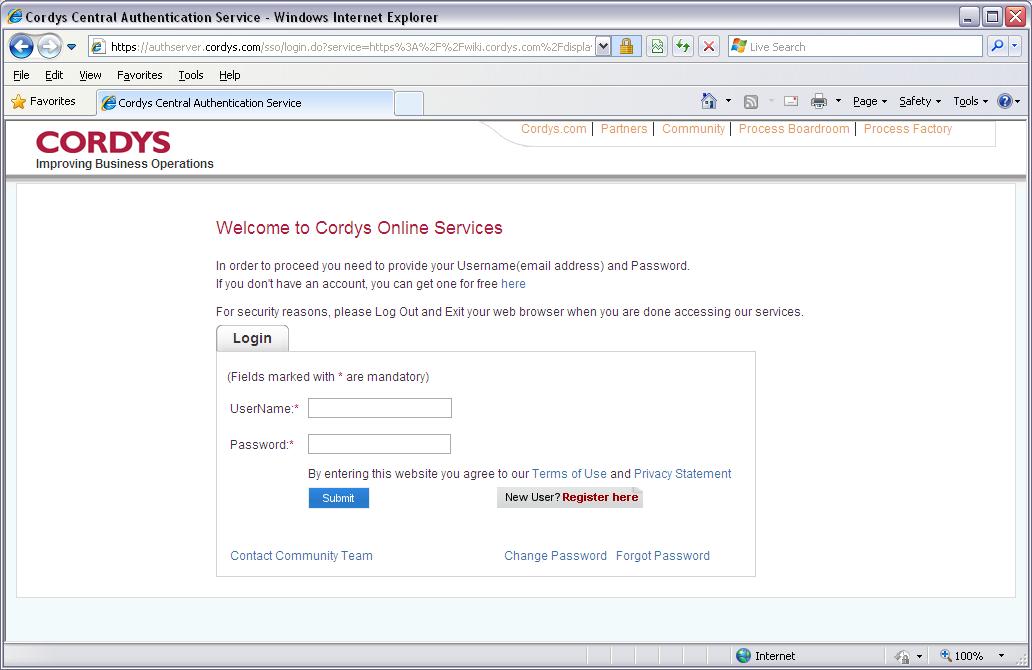
Selecting “New User? Register here” will show the form below.
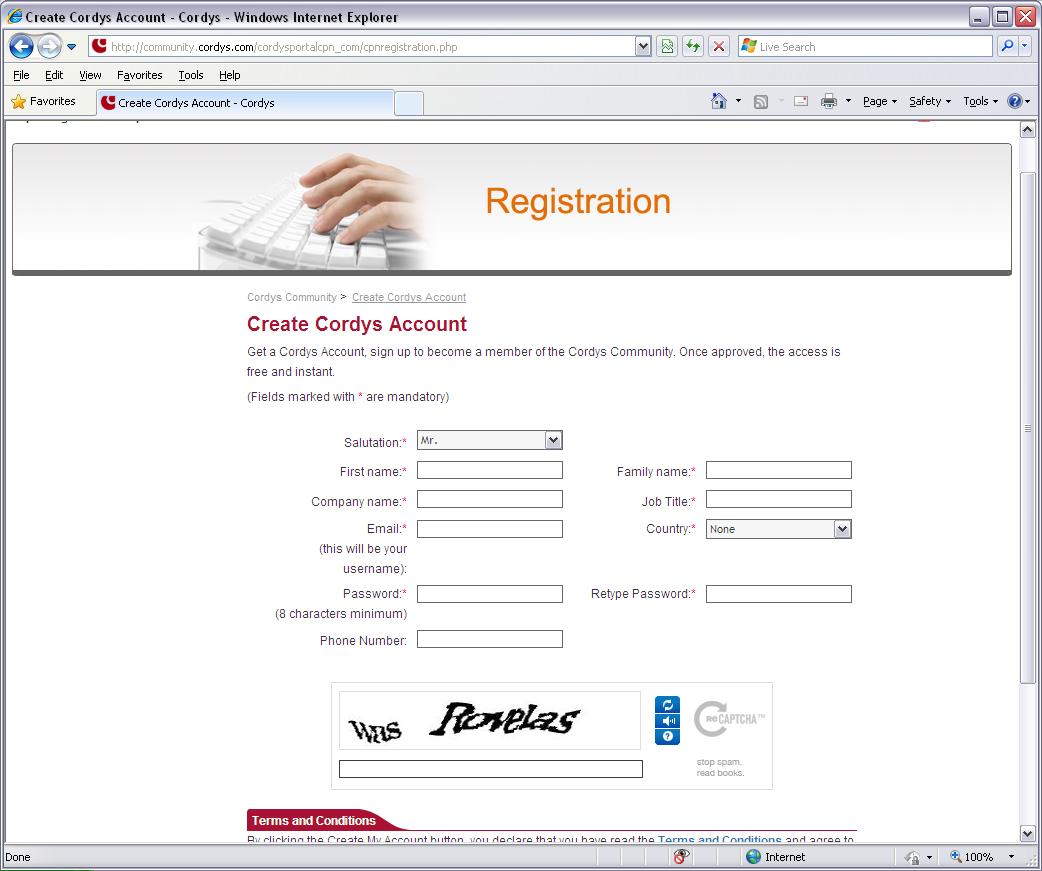
Complete the form and follow further instructions to register.
Once done… you are ready to “play”!
Self study environment
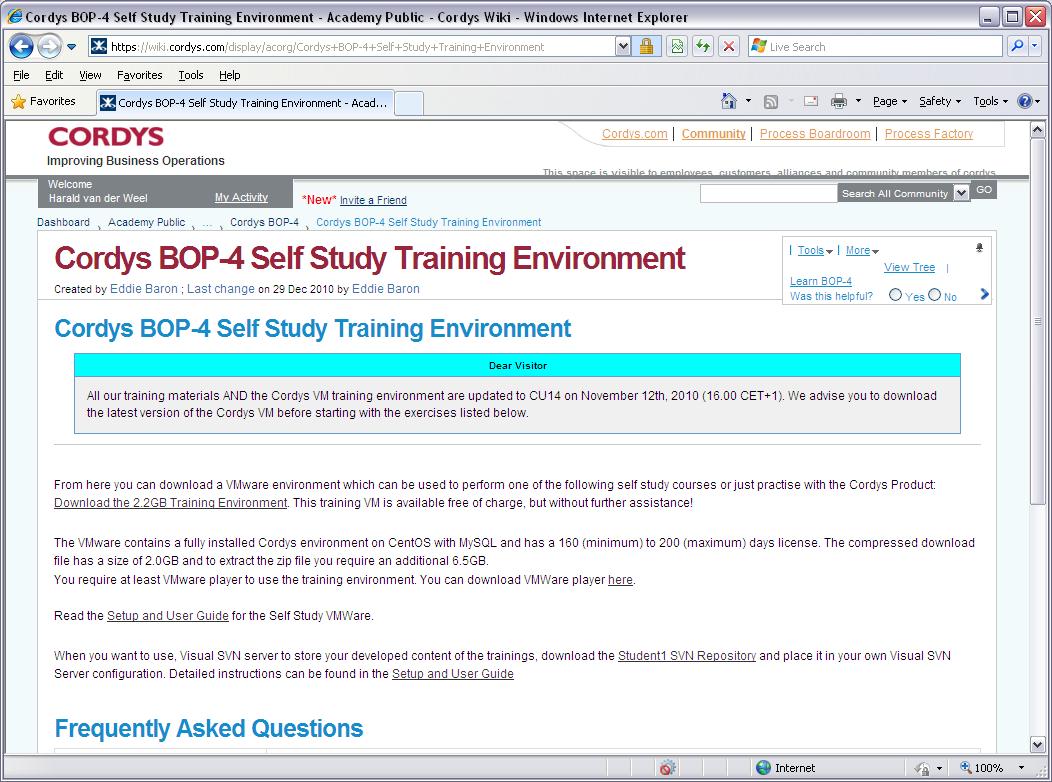
The self study environment (I’ll call it “sandbox”) is nothing but a single downloadable VM-ware image!
It is configured as a complete Cordys server the provides all main functionality.
Apart from allowing “students” to do all practical exercises in the tutorials, it even would allow you to do a complete project (for the 3 months license period at least)
Provided you have a VM Ware player (free downloadable at http://www.vmware.com/ ), setting it up simply requires the following steps:
1. Download the zipped VM Ware environment (It is rather big: Zipped about 2Gb, unzipped about 6Gb)
2. Unzip the VM environment
3. Run the VM image
4. Start a browser session (for the moment IE7 or IE8)
5. Go to the startup URL (Specified in the Setup and User guide)
6. Start using Cordys BOP4, provided a default Student1
(If still more info is required: The steps above are well explained in a “Setup and User guide”, that can be downloaded from the “self study environment” page)This sandbox allows to manage users and provide them with the necessary roles to develop, test, deploy, execute and monitor almost any Cordys work product. The sandbox even allows to use an external SVN version control system to store and version all work products externally from the VM Environment.
The sandbox even provides an example MySQL database with content and web services.
The link to the Self Study Environment is: https://wiki.cordys.com/display/acorg/Cordys+BOP-4+Self+Study+Training+Environment, which invokes the page below.
Fundamentals tutorial
The fundaments tutorial teaches novice Cordys BOP4 users everything to know about the BOP4 environment.
Multiple tutorial “chapters” take the user sequentially through all necessary subjects, in order to make a start with Cordys BOP4.
Each chapter contains theoretical information (documents and presentations) and hands-on exercises to practice the learned skills. The exercises are very concise and even suitable for people with very limited technical skills.
Subjects that are covered are:
- Overview and introduction to the Cordys environment
- Managing users and setting up a new project
- Developing business processes (BPMN models)
- Developing and using services
- Developing user interfaces
- Developing workflows
The exercises of each module should be executed sequentially, because there are certain dependencies between them.They will provide a starting developer with the basic skills to build and run simple BPM solutions.
Note that doing all tutorials will take between about 3 and 5 days to finish, depending on your experience in similar environments.
The link https://wiki.cordys.com/display/acorg/Cordys+Fundamentals+BOP-4 takes you to the page below. The order of the modules is Top-Down

Training extensions
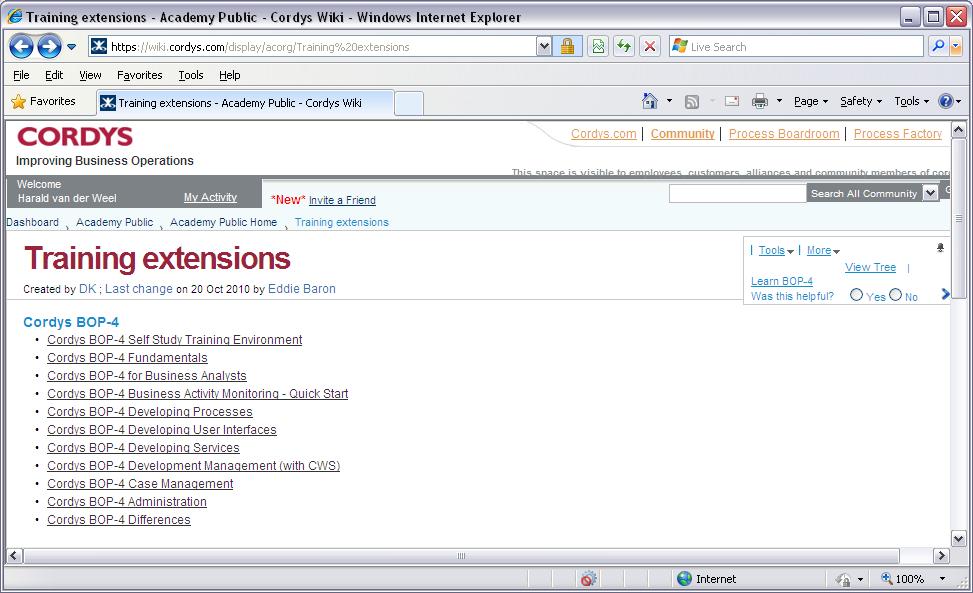
A number of advanced BOP4 topics are offered in “Training Extensions”.
This concerns topics that elaborate certain topics in the fundamentals, but also subjects that have not been covered yet before (like Business Activity Monitoring (BAM) or Case Management).
In case of requiring more in-depth knowledge or considering certification these training extensions are a valuable source of information.
The link https://wiki.cordys.com/display/acorg/Training%20extensions will take you to the following page:
Conclusion
Cordys provides great means for organizations and users to gain knowledge about the BOP4 product from scratch at no (direct) cost.
Please bear in mind:
A computer based training may provide you a good starting point. Effective skills are mostly built up by actually applying them in a practical situation.
I would advise starting teams to involve an experienced developer/solution architect, for a number of reasons, like:
- It provides a direct productivity gain
- It helps to properly setting up the project and guidelines
- It will (cross)-train your inexperienced team
- It will solve “blocking issues” faster
- You may profit of the network of the experienced developer
Good luck to all new Cordys BOP4 adopters.
Hope to meet you in a future project!
Monday, September 27, 2010
Business Objects in BOP4
Introduction
Maintenance of Business Objects is required for most business processes.
MDM has an important role in enterprise data management and quality. It provides a “single point of truth” in the enterprise and allows connected processes and service to use “the latest and greatest” and clean business data. MDM therefore is the preferred way to manage business data.
If MDM is not in place, and business objects are not maintained in backend-applications there are mainly two ways how to maintain and persist business objects:
- A dedicated solution database
- Object Templates
This blog will briefly zoom in into these options
Options
1: Dedicated database
This option can be compared to the traditional application development approach. From the logical data/object model a technical data model is developed. This model describes the database tables and the constraints like primary keys and relations. Based on this a database can be created, preferably separate from the Cordys database instance.
Cordys BOP4 provides the feature to query the metadata of a database, and to generate standard or customized web-services to access the database tabels. These web services should be deployed on a WS-AppServer container, before they can be used e.g. in XForms or BPM-s
Cordys allows developers to add business rules to these web servcies in order to perform additional validations and control the lifecycle of these business objects, represented by the database tables.
2. Object Templates
Object Templates are a construct that is offered by Cordys BOP4.
It allows to define data objects based on Schema fragments. The developer may specify constraints and validations, attach (execution-) rules en specify whether or not changes to the the object are subject to audits. Besides that it is possible to specify if the object should be persisted by Cordys. If that option is selected the instances of the Object Template will be stored inside the CoBOC database (the database used to store information about the BPM instances).
Object templates can be accessed using the following CoBOC WebServices:
- UpdateXMLObject to insert, update or delete an object
- GetObjectsByAttribute to retrieve a object
Obviously these can could be embedded in a dedicated Webservice per separate Object
Best pick?
Both approaches above have pro-s and con-s. The "best" choice depends on project or architectural requirements:
Dedicated database
Pro-s
- Open database format (Data can be accessed easily from outside)
- More control on data (Separate database, custimizable WS services for data access)
Con-s
- Data layer should be maintained manually
- Separate WebServices are required
Object templates
Pro-s
- The data-tier remains hidden
- More productive because of less required steps and objects
- Audit possibilities
Con-s
- Cordys specific data format and Web Services to access data
- Data stored in CoBOC, so it may impact BPM execution performance
Depending on requirements (e.g. portability, testability, traceability, maintainability) one should decide on the way to go.
Regards,
Harald van der weel
Wednesday, September 22, 2010
Testing Cordys BOP-4 using SOAPUI
SOAP-UI
Intro
In the previous project I have experienced soapUI as a low cost but very effective test tool for Cordys BOP-4 solutions. The abilities to invoke web services and test the result from outside the Cordys environment are very convenient. The features to define test scripts make it a very powerful tool to run automatic tests (e.g. for regression tests)
SOAP UI is build around uses an hierarchy of test objects: Each level contains 0 or more of the lower level objects:
1. Project
2. Test-suite
3. Test-case
4. Test step.
Test steps
In the Test Steps the effective test actions are defined. Test actions may for instance be:
invoking a SOAP Service
validating the result (e.g. by checking database content)
Set properties
Pausing for an amount of time.
Executing an script
Properties
Properties contain values that can be used in the tests by a reference to the property. There are system and user defined properties. Properties are always related to one of the test-object types mentioned above and available to all object beneath it in the hierarchy.
A convenient application of properties are end-points –URLs for the web services that are tested. This way it is possible to test web services from another (DTAP) environment simply be changing this property.
Cordys Case
It was my intention to use SOAP UI to test my state-transition model, as described in my earlier BLOG-s. Testing it involves injecting numerous messages via SOAP, and check whether the correct state transition (or error) was invoked.
Initial approach
May first approach was to build test cases that consisted of multiples series of 3 steps:
A SOAP call to send a message
A wait step to allow Cordys to process the request
A validation step.
This approached worked: I was able to work out a number of scenario’s that covered most of the functionality that I wanted to test.
As my state-diagram was pretty extended (consisting of 17 states) I experiences a number of disadvantages:
Building was toilsome, defining similar steps for each state transition to test
The test scenario is hard to read, as only the title of each step is visible, and the vision is blurred because of sequences of 3 steps.
The scenarios were relatively hard to maintain, every time replacing 3 steps in case of a change.
Optimization 1
This led to a need of being able to define the sequence of the test offline, in a file, were only the vital data would have to be specified.
This approach enables to maintain and store the test sequence in a text, making the scenario much more visible and way easier to modify (e.g. simply by inserting some lines)
The solution I developed used the following capabilities of SOAP UI:
Run “Groovy” scripts (See http://groovy.codehaus.org/)
Invoke test cases from groovy
Read files from Groovy
Set property variables in Groovy
The main idea is simple:
Recognize and separate the repeating steps in the test case. Extract one instance of the repeating steps and isolate them in a separate test case (“TC1”)
Replace all required hard-coded values by a property
Define an external file having sets of lines containing values that may on the defined parameters
Build a "groovy" script that reads each line, sets the according parameters and executes TC1
The file now consisted for each state-transition-to-test of a line of multiple properties in a fixed order. Each line was processed by the groovy script and assigned to the properties, before invoking the 3-step test sequence in TC1.
This approach worked fine.
The only disadvantage was that in the sequence certain properties remain the same for a long period of time (e.g. the correlation id of messages, which is the same for all steps in the same sequence).
Optimization 2
The perfectionist in me decided to make the test script more fancy and general purpose, so I added the following options:
The option to specify the properties that are mapped upon the value lists.
#plist,<property-1>,<property-2>, … <property-N>
The option to specify a property that is assigned with a unique value each time it is set
#property,<property>,<value>
The option to specific a specific property until it is set again.
#unique, <property>
The option to add line-comments
//<Any comment>
An example of an input file is:
// MessageId is always unique
#unique, messageId
// For the first sequence we always use the same sequence id
#property,correlationId,cor01
// Each value line contains values for the properties messageType,Sender,Receiver
#plist,messageType,Sender,Receiver
MT01,Party1,Party2
MT02,Party2,Party1
MT01,Party1,Party3
MT02,Party3,Party1
MT03,Party3,Party4
MT04,Party4,Party3
// Now we addone property to the value lines: The correlation Id.
// The pre-set value is overruled now
#plist,correlationId,messageType,Sender,Receiver
Cor02, MT01,Party1,Party2
Cor02,MT02,Party2,Party1
Cor03,MT01,Party1,Party3
Cor03,MT02,Party3,Party1


To provide an idea what the code looked like I add a screendump of the code.
(As a Groovy novice I won't accept any liaibility ;) )
Regards,
Harald van der Weel
Monday, September 20, 2010
BOP-4 BAM imperfections
Where the BOP-4 product stack generally looks very complete, mature and well designed, I have to admit I am still a little less enthusiastic about the Business Activity Monitoring (BAM) part.
In our latest project we have implemented a quiet extensive BAM implementation. We managed to implement a pretty useable dashboard, that satisfied the project and customer needs. However the BAM functionality did not feel quiet as “ready” as e.g. BPM.
BAM intends to monitor KPI-s that map upon a values used in a BPM. To get a graphical representation of these values in you dashboard a number of steps (and Cordys objects) is required.
First the BPM values to reflect in BAM have to be explicitly exposed using the “Message filter” tab of the BPM. A selection is to be made of all values in the message map in the BPM.
Next a Process Monitoring Object (PMO) must be created. This object defines the actual BAM data to collect in the BAM database, and the events when they are collected. It takes the BPM process as the input of the PMO. A selection of exposed data values and possible events must be made, and it is possible to process or enrich the data e.g. by using XPath or web services.
Business Measure (BM) objects are intended to define the actual information from the PMO-s in the BAM database, to reflect in the report. A Business Measure is actually a SQL query that results in a aggregated measurements (averages, totals, counts) reported over a specific “dimension” (e.g. a Location, Person or Unit). This dimension ends up in a GROUP BY clause and it is possible to use a number of parameters in the WHERE clause. A Business Measure will result in a UI dashboard component and a related web service to get the specific data out of the BAM database. The web service can be used autonomously as well.
The BAM dashboard is effectively an XForm, to which one or more BM -graphical components are added. There they can be linked to each other or to standard BAM components like “Time Selectors”. This way the output from one component can be used in a filter of another. This way some kind of down drilling can be implemented. For a little advanced functionality scripting is required.
Though the functionality described above behaves correctly, there are a number of inconveniences and hence potential enhancements. I will name a number that come to mind:
The number of fields to use in a PMO is limited. A PMO just offers a limited amount of fields for each data type (15x String, 10x Numeric, 10x decimal and 10x Date-Time). Exceeding one of these amounts results in an error message.
Unlike other Cordys objects a PMO object must be manually unpublished before a new version can be published. There is no proper warning or error system available to prevent mistakes.
The possibilities to manipulate the looks of the dashboard graphs are very limited.
Not types of graphical components are standard supported by BAM (like the gauge component). It requires intensive scripting.
It is cumbersome to implement drill down features. Relations between data is now specified on graph level, and the business measures should already be prepared for the specific need. It would be more convenient to define these relations on data level.
BAM does not support runtime packages; only staging packages
BAM does not offer any standard reporting options (unlike Cordys Process Factory – CPF)
In an ideal world PMO-s and BM shouldn’t be required. It would be nice to be able to specify data to expose on BPM level, and the relations too. This should be sufficient to define and populate a BAM database. When designing the dashboard standard graphical components should allow to select any data that should be displayed.
At the recent Cordial event I was able to ask the development team after expected developments of BAM. They confirmed these imperfections and announced a number of enhancements that will be implemented with FP1 (Optimistic planning: end of 2010).
It is not hard to imagine I am looking forward very much to FP1, which I expect to solve a number of this issues!
Thursday, September 16, 2010
Personal highlights Cordial 2010
Personal highlights Cordial 2010
Event: Cordial 2010 event
Date: 14 and 15 September 2010
Location: Cordys, Putten, Netherlands

This year I had the luck to attend Cordial 2010.
This is a quick impression and listing of personal highlights of the event:
- A massive crowd of both customers and partners of Cordys attended the events from all over the world, showing that Cordys is very much alive.
- Being introduced to the new CEO and Jan Baan’s successor Per Johnsson
- A very dynamic and inspiring presentation by Manfred Kets de Vries about Leadership
- The opportunity to meet the product development team face-2-face to get an insight in the expected enhancements in both BOP-4 and Cordys Process Process Factory, that will be shipped in fp1. (FP1 ships “when ready”, expected before the end of 2010)
I.m.o. the most interesting:
- Multi browser support
- BAM enhancements (KPI-s in processes, Alignment of BAM)
- MDM
- Connections between CPF and BOP-4
- CPF mobile support
- Extended security features for CPF(e.g. SAML2.0)
- The insights provided by Forrester in the trends in Cloud and BPM, where the most imlessons are:
- There is a bright future for combined on-premises / cloud solutions, mostly depending on the level of confidentiality and commodity
- Data remains the biggest asset
- New business and payment models will arise based on the options that the cloud offers.
- Collaboration using the social networks
- 2 thrilling demonstrations by Matt Davies and Chris Hyde to realize a Cloud and a hybrid BOP-4 / Cloud solution in 9 minutes
- The statement that Cordys shifts from a product demonstration towards a marketing organization, where the product “the most important marketing tool”
- Meeting a lot of old “acquaintances” and many new interesting cordys related professionals.
More detailed info can be found on http://cordial.cordys.com
A more extensive report can be found on:
http://rogervdkimmenade.blogspot.com/2010/09/cordial-2010.html
Looking forward to Cordial 2011!

Tuesday, August 3, 2010
Event-state modeling in Cordys
Case
Recently we have been working on a solution that can be considered as a message broker / hub:
It’s functionality is mainly to receive, validate and route messages between parties in a specific business segment over different channels.
All messages have a specific type, syntax and semantics. Messages may be interrelated; e.g. one message may be a response to another message. A business wide protocol-standard describes the complete interrelation between message types, and specifies the possible sequence of messages in a flow: A so called "conversation". In a conversation any message of a specific type can be only followed by a message of one or more other specific types.
In case we want to monitor conversations we need to model the messaging protocol. This protocol can be considered as an event-state diagram: The last received (and expected!) message in the message sequence reflects the state, and the reception of a new message reflects an event.
Multiple concurrent conversations may be active at a time. This requires a correlation id to link the reception of a new message (see the previous blog “Events in Cordys”) to an active conversation (or to start a new one, if there is no flow active for that particular correlation id).
Implementation
What does it take to implement such an event-state diagram in Cordys BOP-4?
The core of the solution consists of three processes, a decision table and a database-table (with access web services):
- Monitor-process: A process that describes the state model
- HandleMessage-process: A process that is started on new receives new messages and that triggers events.
- WaitForEvent-process: A process that actually waits for an event to be triggered by HandleMessage, where the message is passed
- StateTransitions-decision table: A decision table containing all valid state transions that can be triggered by a message.
- InstanceCorrelation- database table: A database table for storage of the instance id and correlation id
Monitor-process
Monitor is the main process. It describes the overal state model. At runtimes each instance reflects a conversation and it effectively keeps the current state of the “conversation”. A Correlation Id is required to correlate the messages to this conversation. The Monitor process simply consists of a number of states that are interrelated: From a particular state an occuring event may cause a transition to one of one or more possible new states. A state is in fact nothing more than a sub-process call to WaitForEvent. WaitForEvent waits for an event and after a correct (expected) message is received it returns the resulting (new) state to the monitoring process. Only in case a state may have more than 1 possible resulting states the monitoring process should use a decision to effectuate the correct transition. All other logic is handles in the WaitForEvent (by invoking the StateTransitions-decision table)
Because the Monitor-process is started with the first message of a new conversation it has an input message, having the same format as the messages received by WaitForEvent.

WaitForEvent-process
Monitor specifies two main parameters to the WaitForEvent-sub process: The current state of Monitor and the Correlation Id that belongs to the conversation.
The first step in the WaitForEvent is to store its Instance Id in a “InstanceCorrelation” table, together with the Correlation Id before invoking the “Receive Message” step. (See also my previous blog “Events in Cordys”).
Once an event has been triggeredby the HandleMessage-process the WaitForEvent event checks whether it is an event that it expected, depending on the current state. The logic for this check is implemented in the decision table "StateTransitions", that I will explain below.
If a message is received that is not an expected successor of the current state, an exception occurs that ought to be handled. (In our case we simply log an “Unexpected Message” error). After this the process waits for a next event to be triggered.
If the message that is received is expected however, the decision table returns the “new state”, which is returned to the monitoring process. Before returning to the monitor however first the InstanceCorrelation table is cleaned up by removing the record that was inserted at the beginning of the process.

"WaitForEvent"-process
HandleMessage-process
HandleMessage is triggered at reception of a new message. It first uses the correlation id in the message to look up a corresponding Instance Id of a waiting process in the InstanceCorrelation table. If no such record is found, we use the decision table to check if the event is an start-event for a new conversation. If so, a new process instance of Monitor is started -via the invokation of a generated Web Service on Monitor- and passing the message.
In case the Instance Id is found, a notification to WaitForEvent is sent using ExecuteProcess, passing Instance Id and the message (as explained in my previous blog “Events in Cordys”).

"HandleMessage"-process
StateTransitions-decision table
The StateTransitions decision table contains all valid "current"state - message combinations, and the resulting new state. (Similar logic may also be implemented e.g. in a matrix, implemented in a database table, see also my blog "logic in Cordys").
Note that actually all logic on state transitions is effectively implemented in this decision table, and not in the Monitor process: The Monitor process is only intended to keep the current state of a conversation: Not to execute any transition logic, apart from navigating to the correct new state based on the out-come of the StateTransitions decision table!

"StateTransitions"-decission table
Later I will zoom in on the reporting over the monitoring process.
Regards,
Harald van der Weel,
e-mail: haraldvanderweel@gmail.com
Monday, August 2, 2010
Events in Cordys
In certain occassions BPM processes need to able to process events.
Consider the example of a sales process (e.g. CloseDeal) that sends a quote to a customer and waits for the response.
Handling client responses may be the task of a separate process (e.g. ReceiveQuotationResponse) which listens to a specific channel (e.g. SMTP) for customer messages. Once a response (e.g. a reply on a quote) is received it simply should be passed on to the waiting process (CloseDeal), to allow it to process the response and continue.
The good news is that BPMN provides an event mechanism via “Send Message” and “Receive Message” steps. Though implementation of a case similar to the one above in Cordys BOP-4 (CU9) is a bit more complicated than one would expect. The issue is that Cordys supports only the Send Message step for child-processes to trigger an event in a parent process.
In our case this is not sufficient, as ReceiveQuotationResponse is not an child but an independent process.
Fortunately Cordys offers a work-around:
It allows to start new and to continue existing (waiting) process instances by using an “ExecuteProcess” webservice.
How does it work?
The process to be notified of the event (CloseDeal in our example case) should include a “Receive Message” step at the position where the notification event is expectewd (e.g. just after sending the quotation).
In the properties of the “Receive Message” step the input message must be set. This is the (Process Specific defined) message that is expected with the notification.
The notifying process (ReceiveQuotationResponse ) now may invoke the ExecuteProcess web service (found in BPM runtime references “Method Set Process Execution”) to send a notification to the waiting process.
This invocation has 3 mandatory input parameters to be set:
- The field “type” must contain (the literal) “instance”
- The field “message” must contain a correct (and complete) message instance of the type that is expected by the waiting process (and hence is having the same definition as the one in the “Receive Message).
- The field “receiver” should contain the correct instance id of the waiting process. The instance id can be obtained from the instance properties (instance:identifier) of the waiting process.
Passing the instance Id
The question is: How can the notifying process (ReceiveQuotationResponse) obtain the instance id of the process to be notified?
The solution I developed requires a correlation id. The correlation id is an identifying field that is available in both processes and equal in instances of of these processes that are related in this context. In case of the sales process the Quotation Id may be used for instance.
The waiting process stores the instance id together with the correlation id in a database table. The notifying process may use the correlation id (e.g. received in the customer message) to retrieve the instance id, and use pass this with the ExecuteProcess invocation.
In concrete the solution requires:
- A database table, consisting of (at least) two fields: CorrelationId (primary key) and InstanceId (and an access web services)
- Two steps (at least) in de the process that should receive the notification:
o The step is to store the instance id with in de database together with the correlation id
o The second is a “Receive Message” step
- Two steps (at least) in the notifying process
o The first to read the instance id based on the correlation id
o The second to invoke the ExecuteProcess
Note that the approach may require additional processing like cleaning up the database table and error checking.
A future enhancement in Cordys to the Send en Receive message steps that allows to specify a correlation id would be a great improvement.
Friday, July 23, 2010
Storing integer values in Cordys
Cordys offers out of the box functionality to generate web methods to store data in existing database tables. Persisting business objects is facilitated nicely this way.
The standard functionality works all fine, until integer values are used.
If the process is using an XSD having integer fields, mapping them upon an integer field in a database table should not be much of an issue, one might think. In case using plain static values the functionality works fine indeed.
However: When XPath functionality are used to set the integer values in the BPM (e.g. via a function or operator) the result is that to all integer values are provided with an additional decimal point and a zero!
Hence: In case the XML value ./value has the value 1, the XPath operation ./value + 1 does not result (as one might think) simply in 2: The value is converted to 2.0
The actual reason is not in Cordys, however in XML/XPath. XML/XPath does not really support integer values: They are just floating point values, having 0 as decimal fraction.
This “feature” is pretty innocent when just using XPath in the BPM. However when this value has to be made persistent in a database in our case MySQL 5.0) there is in issue: The query to insert the value 2.0 in an integer field the database table results in error because of this format.
This issues cannot be solved in XPath by using the round() function: It does add the .0 itself too.
Fortunatly there is a rather inexpensive solution to the problem: use the string() function.
The XPath spec describes:
if the number is an integer, the number is represented in decimal form as a
Number <http://www.w3.org/TR/xpath#NT-Number> with no decimal point and no
leading zeros, preceded by a minus sign (-) if the number is negative
Hence: Replacing ./value + 1 by string(./value + 1) will leave you with an value without decimal point.
Regards,
Harald van der Weel
Sunday, June 27, 2010
Implementing BPM logic in Cordys-BOP4
Introduction
Almost any Business Process has a conditional flow, which is determined by business logic. An example is to determine the approver for a purchase: In case the order amount does not exceed 50 dollars approval may not be required. However for amounts between 50 and 5000 euro the department-manager may need to approve. Above 5000 euros it may be the business line manager, and above 100000 euros even the CEO.
Cordys BOP-4 allows us to define Business Process logic in multiple ways. This flexibility is nice. However it raises the question: "When to use what"?
Considerations
There are several considerations to make before selecting one of the available alternatives:
Agility:
How frequent are the expected modifications? Should it be possible to perform them without restarting or redeploying the application?
Efficiency:
How much effort does it take to implement the rule?
Complexity/Maintanability:
How complex are the rules: How many steps and different conditions do they contain? Who should be able to perform the change: A business user or an IT engineer.
Functionality:
What functions and data do you need to be able to access? Do you need to be able to access database content? Perform difficult calculations or text operations?
Readability:
Should business be able to read and understand the logic to be able to grasp the business process.
Architecture:
It may be favorable to have your logic itself logically organized, for the following reasons so it is clear for business users and developers where to find certain logic, and to be able to package and deploy logic as much as possible in comprehensible units.
Lets first discuss the options:
Constructs to implement logic
BOP-4 offers the following constructs to implement business logic:
(Note that most of the alternatives above may be used in conjunction with other alternatives.)
BPM Decision steps
The BPM modeling language BPMN allows to directly built logic into Business Process models using the construct "Decision". This step allows to select multiple alternative paths that may be chosen, based on a condition for each path. There may be one default condition that is executed when all other condition evaluate to false. The conditions are defined in "XPath".
+ The logic is visible in the process itself, which contributes to readability and architecture
- Complex logic may explode into an incomprehensible process model
- Changes should pass a complete DTAP cycle
- Advanced functionality will require knowledge of XPath
Recommended usage
- Simple conditions in Business Process, e.g.:
- Checking process inputs
- Checking output from earlier steps

Example of decision step
BPM Mappings
BPM mappings allows the assignment of values in steps in a BPM using Xpath. Xpath contains a number of functions that may be used to implement logic (e.g. Boolean functions, regular expressions and selection expressions).
+ The logic is stored in the BPM model. (Architecture)
- Changes should pass a complete DTAP cycle
- Logic is "hidden" in implementation details
- Limited functionality. More advanced functions require knowledge of XPath
- Logic is less visible / comprehensible to business users
Usage
- Simple logic to influence attribute values

Example of mapping Xpath
Transformation objects
Transformation object transform one data structure into another, using XSLT (which uses XPath underneath). Transformations may be used in BPM or turned into web services.
+ Supports complex logic
+ Reusable
- The logic is stored outside the BPM model. (Architecture)
- Changes should pass a complete DTAP cycle
- More complex logic requires XPath/XSL knowledge.
- Logic is not visible / comprehensible to business users
Usage
- More sophisticated logic used to transform a (business) object into another (business) object
Decision Tables
Decision Tables are a number of rules, containing one or more conditions and one or more (resulting) actions. The conditions use XPath-statements. These use the specified data interface, which is a predefined data structure. The actions concern assigning values to the data structure, or e.g. running a web service.
+ Supports complex logic
+ Reusable
+ The logic is stored in Business comprehensible (=maintainable?) objects.
+- Changes may be delivered in a staging packages, which allows online maintenance by business users. *)
- Best suitable for compact rules: More complexity or functionality may require XPath knowledge
Usage
- More complex IF.. THEN conditions on the the same attributes
- From 2 to 10+ different conditions
- Rules that check values (e.g. amounts) against static numbers, that may be changed frequently (by business users?)
*) For advantages/disadvantages of staging packages, see:
https://wiki.cordys.com/pages/viewpage.action?pageId=164794477

Example of decision table
Business Rules
Business Rules are technically similar to decision tables, but are attached to events on business objects. (e.g. Insert in the database).
Usage
- Validations
- Triggering actions, comparable to stored procedures.
- Triggering BPM-s on specific events
Database queries
Logic may be implemented by executing SQL on the database e.g. via look-up tables, in order to retrieve specific values for specific objects. In order to use the queries with BPM they will have to exposed via a web service.
+ (Static) logic may be altered/extended during run-time. Screens may be offered to Business to alter the look-up tables.
+ May support large amounts of data. (E.g. customer bases)
- Logic is divided over 2 objects: data and query- Logic is separated from business process.
Usage
- Look-up actions of larger amounts of data
- Logic that the user should be able to alter implicitly at run-time by changing the database content
Java
Java allows to write logic in java classes. In order to use it with BPM the java classes will have to be exposed via a WebService.
+ Maximum functionality offered. Suitable for complex rules
- Java requires more objects and more complex settings for deployment
- Changes should pass a complete DTAP cycle
- Require knowledge of Java
- Logic is not visible to business user
Usage
- Complex manipulations of numeric, date or string values.
- Complex logical structures (combined loops, nested IF..THEN-s, switch statements etc)
XForm/java script
Java script may be used in User Interfaces to react on user events and take appropriate actions. This may include validations or UI actions, but also invoking Web Services (which may include business processes and business rules).

+ Directly usable in User Screens
- Not visible nor comprehensible for business users
- Requires java-script skills
- Executed in client, which may cause issues due to different browser types
Usage
- Triggering actions from a User interface (e.g. starting a BPM by a press on a button)
- (Cross) field Validations
It is crucial to select the right option in order to meet the non-functional requirements as stated earlier in this blog.
Regards,
Harald van der Weel
Sunday, June 13, 2010
Evaluation of Rules and Decision Tabl...
Introduction
Cordys BOP-4 offers numerous ways to add logic to Business Processes.One convenient way is to use Business Rules and Decision Tables. Business Rules apply to to business objects and are generally used to implement validations and logic that is often addressed at database level using stored procedures.
Decision Tables have no direct link to a business object. They implement logic that is mainly used for medium complex conditional behaviour in a Business Process. Using decision tables we may prevent complex sequences of conditions appearing in our BPM, blurring the real intentions of the business process.
Decision Tables
A decision table consists of a set of Rules, which each contain one or more conditions and actions. Conditions are evaluated to either true or false. Actions are executed if all conditions for a Rule evaluate to true. The schema fragment is the actual interface to the Decision Table. If used as a BPM activity it is exposed in the Message Map of the Business Rule modeler, and allows to specify input values and to retrieve output values after the step is completed. From the schema fragment attributes may be selected to use in conditions (e.g. for comparisons), and in actions (e.g. to assign values).

Example of Decision Table, showing all concepts described above
Execution
Execution of a Decision Table-step in a BPM comprises the following:
- First the massage mapping on the Decision Table attributes is made.
- Next the evaluation process is started: Every rule is evaluated separately in sequence, starting from left most, working to right.
- The values of the concerned condition attributes are used to evaluate the conditions of the rule. If each condition of a rule evaluates to true, the actions specified for that specific rule are executed, starting with the top-most, working down to the bottom.
Example
In case we have a Decision Table TD, containing 3 rules: R1, R2 and R3, each having 2 conditions (Cx.1 and Cx.2, where x is the rule number), and 2 actions (Ax.1 and Ax.2 where x is the rule number), the statement in terms of pseudo code code would be like:IF ( C1.1 AND C1.2) THEN
a1.1
a1.2
END IF
IF ( C2.1 AND C2.2) THEN
a2.1
a2.2
END IF
IF ( C3.1 AND C3.2) THEN
a3.1
a3.2
END IF
Implications
The example shows three important implications:
- Each rule is evaluated, even if its predecessor evaluates to true. (Hence: multiple rules may be executed)
- There is no OTHERWISE or DEFAULT construct available. (Like in the java SWITCH..CASE statement)
- The execution of an action of a certain rule may impact the result of the execution of one of the succeeding rules (e.g. by modifying values of attributes used in the conditions)
The solution would be to create an additional rule: R4.
R4 would contain 3 rules that are all the negations of the conditions of R1, R2 and R3:
In pseudo code:
IF ((NOT (C1.1 AND C1.2)) AND (NOT (C2.1 AND C2.2)) AND (NOT (C3.1 AND C3.2))) THENOne can imagine that this may be an time consuming and error prone activity if the Decision Table contains more rules and conditions.
a_def
END IF
An alternative may be using a flag, indicating if at least one of the rules has evaluated to true. This flag should be set initially to false. In case a rules evaluates to true, the flag should be set to true. (This implies that every rule would need an additional action that implements this!). In last (default) rule it just requires to check the value of the flag: If it is (still) false, the default action should be executed, otherwise not.
Note that the flag will have to be contained in the schema fragment of the Decision Table, and hence appears in its interface. Not the most elegant solution, but in certain cases a good trade off for the the possible complex conditions as described above.
Harald van der Weel
e-mail: haraldvanderweel@gmail.com
Subscribe to:
Posts (Atom)